How to use AHAspeed

How to use coupon in AHAspeed?

How to use coupon in AHAspeed:

1. Download AHAspeed

Go to the official website or app store to download and install AHAspeed. Download Link:https://r.aha666.com

2. Register and Login

Open the app, create a new account, or log in with your existing one.

3. Go to Store Page

After logging in, tap “Buy Plan” on the home screen to enter the store.
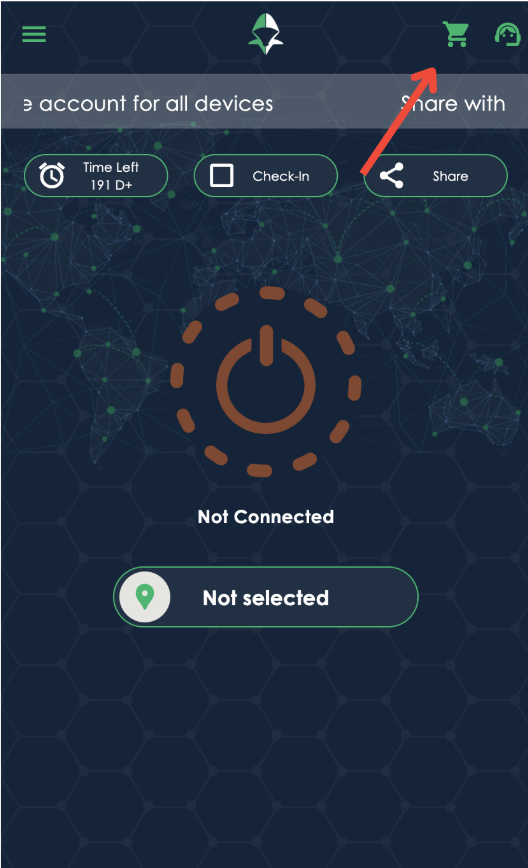


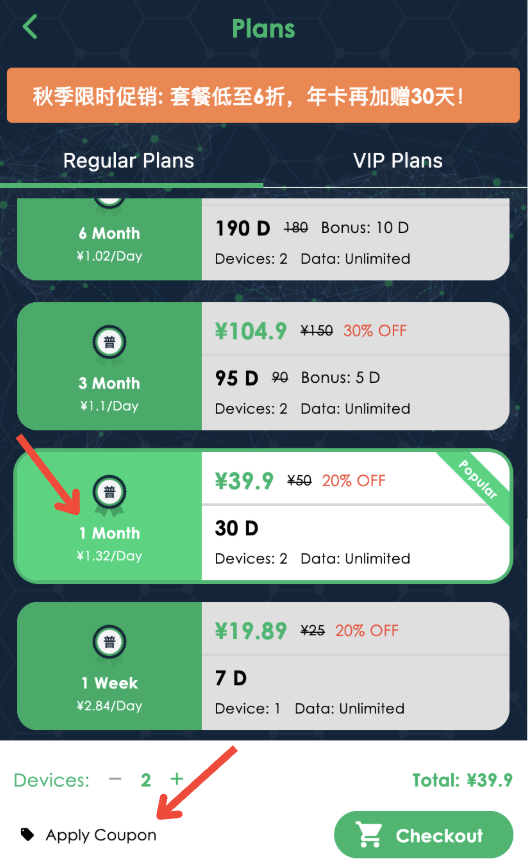
4. Use a Coupon

At the bottom of the screen, tap “Apply Coupon”, enter your coupon code, and confirm to enjoy your discount.

 

How to upgrade your existing plan and increase the number of devices.

Please follow these steps:
Menu in the upper left corner of the App - My Account - My Packages - Click the "Upgrade" button behind the current package - Enter the upgrade package interface:
Select the new plan you want to upgrade to or the number of devices you want to increase under "New Plan" below.
If you only want to add more devices to the original package, please select your current package type in the new package and then add the number of devices below.

The difference between VIP packages and ordinary packages.

The VIP package is a direct dedicated line with extremely fast speed. It supports more devices to be online at the same time. There are 30+ countries and regions to choose from. There is no limit or speed limit. High-end dedicated servers are more stable.

How to unbind a device from my account?

  • While you try to login on a new device, if the device limit has been reached, you will get redirected to the "Unbind Device" page, from there you can unbind the devices
  • Or, you can go to "Menu" -> "App Settings" -> "Device List", click on the device to unbind it.

How to retrieve password or username?

We understand that sometimes we forget our passwords or even usernames. That is why we make it easy for you. Here is what you can do:

  • Forgot username: contact us and provide the payment record screenshot to us. 
  • Forgot password: You can click on forgot password in the app.

What are "Global Mode" and "Split Mode" routing modes?

Global Mode: Access everything with VPN. This might slow down some local websites & apps traffic.

Split Mode: Only use VPN when accessing common GEO blocked (China firewall blocked) websites, e.g. Google, Youtube, Netflix etc. When accessing Chinese websites, use local network without VPN.

You can change the routing mode under App Settings.

If you found certain websites or apps can't be accessed, please change your routing mode settings to "Global Mode".

Contact us if you have any other questions.

sock5 Proxy:IP address:127.0.0.1 ,Port:1234
http Proxy:   IP address:127.0.0.1 ,Port:9876

How to refer a friend, earn points and redeem point for plans

You can earn points by referring a friend, and then use points to redeem plans. These are the details:

  • To get the "Referral Code" or "Referral Link", go to "Share & Gift", click on "Share Now". Then you can share it to your friends, publish it to your blog or social media websites.
  • Upon a success referral, you will earn 1 point; Each point can redeem for a 1-day pass.
  • After redemption, you can view your plans under "My Account".
  • A successful referral requires: the referee downloads and uses the app. If your referee has downloaded the app but hasn't started using the app, your referral point will not be added into your account until the referee uses the app.